โš ๏ธ
Free Version Notice: This personal hobby project is distributed for free. It is not fully finished yet, so please forgive minor bugs and rough edges. Feedback is always welcome.
๋ฌด๋ฃŒ ๋ฒ„์ „ ๊ณต์ง€: ๊ฐœ์ธ ์ทจ๋ฏธ ํ”„๋กœ์ ํŠธ์ด๋ฏ€๋กœ ๋ฌด๋ฃŒ๋กœ ๋ฐฐํฌํ•˜๊ณ  ์žˆ์Šต๋‹ˆ๋‹ค. ์•„์ง ๊ฐœ๋ฐœ์ด ์™„์„ฑ๋œ ์ƒํƒœ๋Š” ์•„๋‹ˆ์–ด์„œ ์ž์ž˜ํ•œ ๋ฒ„๊ทธ๊ฐ€ ์žˆ์„ ์ˆ˜ ์žˆ์œผ๋‹ˆ ๋„ˆ๊ทธ๋Ÿฝ๊ฒŒ ์–‘ํ•ด ๋ถ€ํƒ๋“œ๋ฆฝ๋‹ˆ๋‹ค. ํ”ผ๋“œ๋ฐฑ์€ ์–ธ์ œ๋‚˜ ํ™˜์˜ํ•ฉ๋‹ˆ๋‹ค.
๐Ÿงช
Built-in AI (Experimental): The built-in AI composition features are experimental. The model will continuously improve as training progresses โ€” expect better results over time.
๋‚ด์žฅ AI (์‹คํ—˜์ ): Built-in AI ์ž‘๊ณก ๊ธฐ๋Šฅ์€ ์‹คํ—˜์ ์œผ๋กœ ๊ฐœ๋ฐœ ์ค‘์ž…๋‹ˆ๋‹ค. ํ•™์Šต ๋ฐฉํ–ฅ์— ๋”ฐ๋ผ ์ ์  ๋” ๋‚˜์€ ๋ชจ๋ธ์ด ์ œ๊ณต๋  ์˜ˆ์ •์ž…๋‹ˆ๋‹ค.

A Personal Hobby AI-Driven Composer IDE

ArkComposer

A personal hobby project for AI-assisted composition

A personal hobby AI-driven Composer IDE with a built-in MCP server and a built-in AI that is still actively being trained.
Now with a full piano-roll style Edit Measure (MIDI) editor, direct AI Voicing and AI Accomp actions, a clearer top-bar workflow with status bar, and built-in update checking.
Connect Claude Code Desktop, Codex app, or any MCP-capable AI client and compose together in natural language.
๊ฐœ์ธ์ ์ธ ์ทจ๋ฏธ๋กœ ๋งŒ๋“œ๋Š” AI ๊ธฐ๋ฐ˜ Composer IDE์ž…๋‹ˆ๋‹ค. ํ”ผ์•„๋…ธ๋กค ์Šคํƒ€์ผ์˜ Edit Measure (MIDI) ํŽธ์ง‘๊ธฐ, AI VoicingยทAI Accomp ์ง์ ‘ ํ˜ธ์ถœ, ์ƒํƒœ๋ฐ”๊ฐ€ ํฌํ•จ๋œ ์ƒˆ ์ƒ๋‹จ ์›Œํฌํ”Œ๋กœ, ์ž๋™ ์—…๋ฐ์ดํŠธ ๊ธฐ๋Šฅ์ด ์ถ”๊ฐ€๋˜์—ˆ์Šต๋‹ˆ๋‹ค. ์•…๋ณด ํŽธ์ง‘๋ถ€ํ„ฐ AI ์ž‘๊ณก๊นŒ์ง€ ๋Œ€ํ™”๋กœ ์Œ์•…์„ ๋งŒ๋“ค ์ˆ˜ ์žˆ์Šต๋‹ˆ๋‹ค.

โ†“ Download Free  ยท  ๋ฌด๋ฃŒ ๋‹ค์šด๋กœ๋“œ GitHub โ†’ Claude Desktop Guide โ†’ Codex App Guide โ†’
ArkComposer โ€” Multi-track score editor with AI composition tools

Everything you need
to compose.

์ž‘๊ณก์— ํ•„์š”ํ•œ ๋ชจ๋“  ๊ฒƒ.

๐ŸŽผ
Full Score Editor
์™„์ „ํ•œ ์•…๋ณด ํŽธ์ง‘๊ธฐ
Multi-track notation with notes, rests, dynamics, key/time signatures, lyrics, and chord symbols.

๋ฉ€ํ‹ฐํŠธ๋ž™ ์•…๋ณด ํŽธ์ง‘ โ€” ์Œํ‘œ, ์‰ผํ‘œ, ๋‚˜ํƒ€๋ƒ„๋ง, ์กฐํ‘œ, ๋ฐ•์žํ‘œ, ๊ฐ€์‚ฌ, ํ™”์Œ ๊ธฐํ˜ธ.
๐ŸŽน
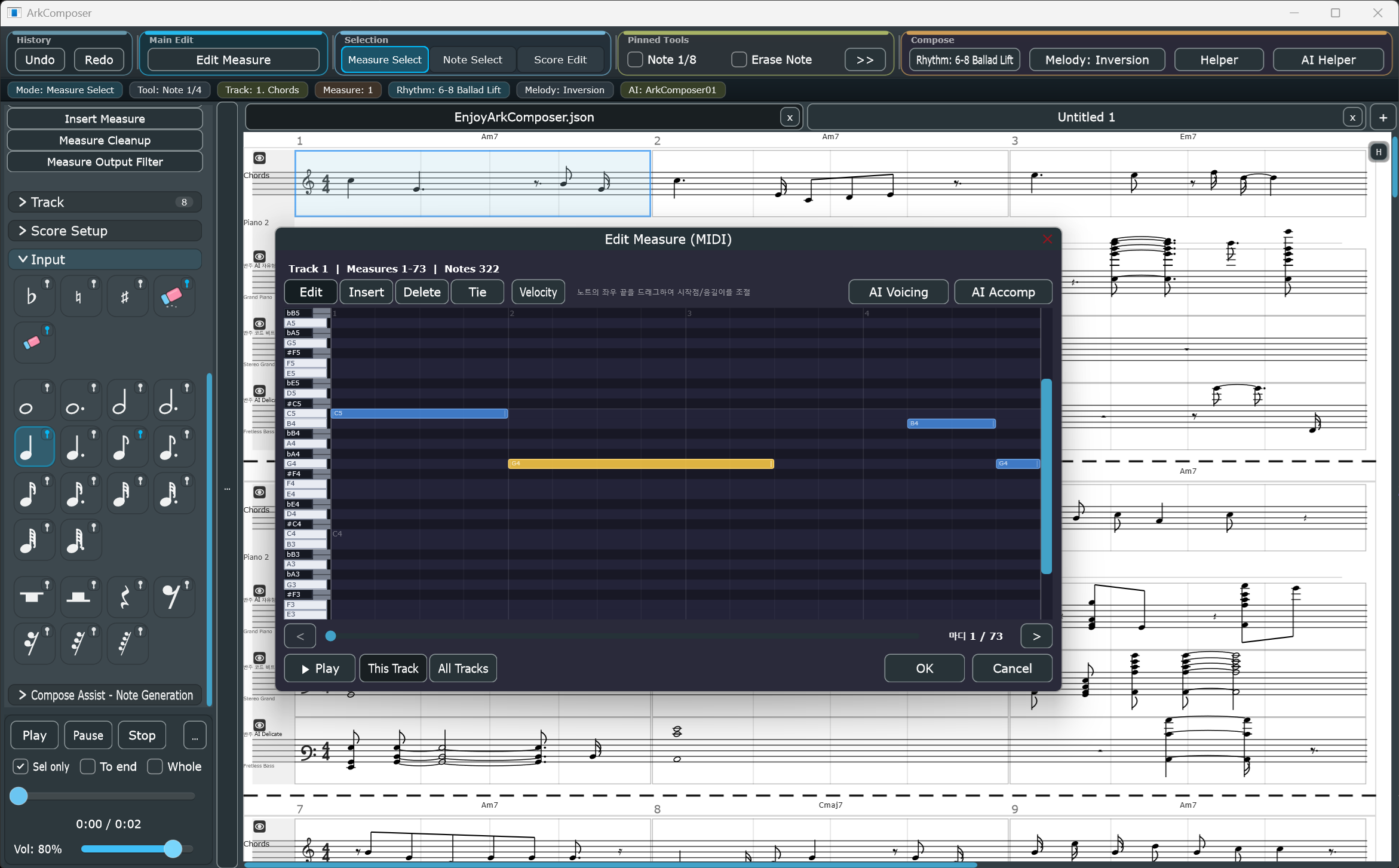
Edit Measure (MIDI)
๋งˆ๋”” ํŽธ์ง‘ โ€” ํ”ผ์•„๋…ธ๋กค
Piano-roll style editor with Edit / Insert / Delete / Tie modes. Track-wide measure navigation, built-in playback, velocity shaping, and direct AI Voicing & AI Accomp actions โ€” all without leaving the score workflow.

ํ”ผ์•„๋…ธ๋กค ์Šคํƒ€์ผ ํŽธ์ง‘๊ธฐ โ€” ํŽธ์ง‘/์‚ฝ์ž…/์‚ญ์ œ/ํƒ€์ด ๋ชจ๋“œ, ํŠธ๋ž™ ๋‚ด ๋งˆ๋”” ํƒ์ƒ‰, ์žฌ์ƒ, ๋ฒจ๋กœ์‹œํ‹ฐ ์กฐ์ ˆ, AI VoicingยทAI Accomp ์ง์ ‘ ํ˜ธ์ถœ์„ ์•…๋ณด ์›Œํฌํ”Œ๋กœ ์•ˆ์—์„œ ๋ฐ”๋กœ ์‚ฌ์šฉ.
๐Ÿงญ
Top-Bar Workflow & Status Bar
์ƒ๋‹จ ๋ฐ” ์›Œํฌํ”Œ๋กœ & ์ƒํƒœ ๋ฐ”
Edit Measure is the primary action. Measure Select, Note Select, and Score Edit split selection from editing. A status bar shows current mode, tool, track, measures, rhythm, melody, and AI state at a glance.

Edit Measure๊ฐ€ ์ฃผ ๋™์ž‘. Measure SelectยทNote SelectยทScore Edit๋กœ ๋ชจ๋“œ ๋ถ„๋ฆฌ. ์ƒํƒœ ๋ฐ”์—์„œ ํ˜„์žฌ ๋ชจ๋“œ, ๋„๊ตฌ, ํŠธ๋ž™, ๋ฆฌ๋“ฌ, ๋ฉœ๋กœ๋””, AI ์ƒํƒœ๋ฅผ ํ•œ๋ˆˆ์— ํ™•์ธ.
๐Ÿค–
AI Voicing & AI Accompaniment
AI ๋ณด์ด์‹ฑ & AI ๋ฐ˜์ฃผ
AI Voicing from the top menu or inside Edit Measure (MIDI). AI Accomp generates accompaniment following melody and harmony. Styles include AI Chord Beat, AI Arpeggio, AI Free, AI Free (Melody Variation), and AI Drum Beat.

AI Voicing์€ ์ƒ๋‹จ ๋ฉ”๋‰ด ๋ฐ Edit Measure์—์„œ ์ง์ ‘ ํ˜ธ์ถœ. AI Accomp๋Š” ๋ฉœ๋กœ๋””ยทํ™”์„ฑ์„ ๋”ฐ๋ฅด๋Š” ๋ฐ˜์ฃผ๋ฅผ ์ƒ์„ฑ. AI Chord Beat, AI Arpeggio, AI Free, AI Free (Melody Variation), AI Drum Beat ์Šคํƒ€์ผ ์ง€์›.
๐ŸŽต
Melody & Rhythm Variation
๋ฉœ๋กœ๋”” & ๋ฆฌ๋“ฌ ๋ณ€์ฃผ
Inversion, retrograde, augmentation, pentatonic, passing tones. Genre-based rhythm patterns.

์ „์œ„, ์—ญํ–‰, ํ™•๋Œ€, 5์Œ ์Œ๊ณ„, ๊ฒฝ๊ณผ์Œ. ์žฅ๋ฅด๋ณ„ ๋ฆฌ๋“ฌ ํŒจํ„ด ๋ณ€์ฃผ.
๐ŸŽน
SoundFont Playback
์‚ฌ์šด๋“œํฐํŠธ ์žฌ์ƒ
Per-track instrument assignment with .sf2 SoundFont support. Enlarged volume controls, improved transport. Export to WAV and MP3 (higher quality).

ํŠธ๋ž™๋ณ„ ์•…๊ธฐ ์ง€์ •, SF2 ์‚ฌ์šด๋“œํฐํŠธ ์ง€์›. ๊ฐœ์„ ๋œ ๋ณผ๋ฅจ ์ปจํŠธ๋กคยท์žฌ์ƒ ํ๋ฆ„. WAV/MP3 ๊ณ ํ’ˆ์งˆ ๋‚ด๋ณด๋‚ด๊ธฐ.
๐Ÿ“Š
Melodic Mood Overlay
๋ฉœ๋กœ๋”• ๋ฌด๋“œ ์˜ค๋ฒ„๋ ˆ์ด
Visual stability/tension analysis on every note. 3 color styles: Jewel, Muted, Editorial.

์Œํ‘œ๋ณ„ ์•ˆ์ •/์ „ํ™˜/๊ธด์žฅ ์‹œ๊ฐํ™”. 3๊ฐ€์ง€ ์ƒ‰์ƒ ์Šคํƒ€์ผ.
๐Ÿ”„
MIDI Import / Export
MIDI ๊ฐ€์ ธ์˜ค๊ธฐ / ๋‚ด๋ณด๋‚ด๊ธฐ
Import MIDI files and convert to editable score. Export to standard MIDI format.

MIDI ํŒŒ์ผ์„ ์•…๋ณด๋กœ ๋ณ€ํ™˜. ํ‘œ์ค€ MIDI ํ˜•์‹์œผ๋กœ ๋‚ด๋ณด๋‚ด๊ธฐ.
๐Ÿ“‘
Score Export
์•…๋ณด ๋‚ด๋ณด๋‚ด๊ธฐ
Export your score as PDF, PNG, or JPG. Native format: .arkscore / .json (human-readable).

PDF, PNG, JPG๋กœ ์•…๋ณด ๋‚ด๋ณด๋‚ด๊ธฐ. ์ž์ฒด ํฌ๋งท .arkscore / .json.
๐ŸŽ›๏ธ
Plugin Filter System
ํ”Œ๋Ÿฌ๊ทธ์ธ ํ•„ํ„ฐ ๊ตฌ์กฐ
Distortion, Echo, and more. Extensible plugin architecture for custom audio effects.

๋””์Šคํ† ์…˜, ์—์ฝ” ๋“ฑ ์˜ค๋””์˜ค ์ดํŽ™ํŠธ ํ•„ํ„ฐ. ํ™•์žฅ ๊ฐ€๋Šฅํ•œ ํ”Œ๋Ÿฌ๊ทธ์ธ ๊ตฌ์กฐ.
๐Ÿ”ƒ
Auto Update Check
์ž๋™ ์—…๋ฐ์ดํŠธ ํ™•์ธ
Check for Updates compares your version against the latest GitHub Release and prepares the download/apply flow.

Check for Updates๋กœ ์ตœ์‹  GitHub Release์™€ ๋ฒ„์ „์„ ๋น„๊ตํ•˜๊ณ  ๋‹ค์šด๋กœ๋“œ/์ ์šฉ ํ๋ฆ„์„ ์•ˆ๋‚ดํ•ฉ๋‹ˆ๋‹ค.

Talk to your score.

์•…๋ณด์—๊ฒŒ ๋ง์„ ๊ฑฐ์„ธ์š”.

โœ… Tested Mode 1 โ€” stdio ยท Claude Code Desktop
Launch ArkComposer as an MCP stdio server and connect directly from Claude Code Desktop.
Claude Code Desktop์—์„œ ์ง์ ‘ MCP stdio๋กœ ์—ฐ๊ฒฐํ•ฉ๋‹ˆ๋‹ค.
// claude_desktop_config.json { "mcpServers": { "arkcomposer": { "command": "ArkComposer.exe", "args": ["--mcp-mode"] } } }
โœ… Tested Mode 2 โ€” HTTP/SSE ยท Codex App
Start the MCP server from the ArkComposer UI, then register the HTTP/SSE endpoint in the Codex app MCP settings.
ArkComposer์—์„œ MCP ์„œ๋ฒ„๋ฅผ ์ผ  ๋’ค, Codex app MCP ์„ค์ •์— HTTP/SSE ์ฃผ์†Œ๋ฅผ ๋“ฑ๋กํ•ฉ๋‹ˆ๋‹ค.
# 1. Run ArkComposer normally # 2. Left palette โ†’ MCP Server โ†’ Start # 3. Open Codex app โ†’ Settings โ†’ MCP servers # 4. Set URL to: http://localhost:9101/sse
โœ… Tested Mode 3 โ€” TCP ยท Advanced / CLI
For raw JSON-RPC clients, use the TCP port exposed by ArkComposer. This is useful for Codex CLI or custom MCP tooling.
raw JSON-RPC ํด๋ผ์ด์–ธํŠธ๋Š” ArkComposer์˜ TCP ํฌํŠธ์— ์ง์ ‘ ์—ฐ๊ฒฐํ•  ์ˆ˜ ์žˆ์Šต๋‹ˆ๋‹ค. Codex CLI๋‚˜ ์ปค์Šคํ…€ ๋„๊ตฌ์— ์ ํ•ฉํ•ฉ๋‹ˆ๋‹ค.
# 1. Run ArkComposer normally # 2. Left palette โ†’ MCP Server โ†’ Start # 3. Connect your client to: localhost:9100
Note for Codex app: If you want to switch between HTTP/SSE and stdio inside the Codex app, uninstall the existing ArkComposer MCP entry first, then create the new one.
Codex app์—์„œ๋Š” HTTP/SSE์™€ stdio ํƒ€์ž…์„ ์„œ๋กœ ๋ฐ”๊พธ๋ ค๋ฉด, ๊ธฐ์กด ArkComposer MCP ํ•ญ๋ชฉ์„ ๋จผ์ € ์ œ๊ฑฐํ•œ ๋’ค ์ƒˆ๋กœ ๋“ฑ๋กํ•ด์•ผ ํ•ฉ๋‹ˆ๋‹ค.

Note on ChatGPT: ChatGPT does not natively support MCP. A separate OpenAPI server is required to bridge ChatGPT function calls to ArkComposer's MCP tools.
ChatGPT๋Š” MCP๋ฅผ ์ง์ ‘ ์ง€์›ํ•˜์ง€ ์•Š์Šต๋‹ˆ๋‹ค. ChatGPT ์—ฐ๋™์„ ์œ„ํ•ด์„œ๋Š” ๋ณ„๋„์˜ OpenAPI ์„œ๋ฒ„ ๊ตฌํ˜„์ด ํ•„์š”ํ•ฉ๋‹ˆ๋‹ค.
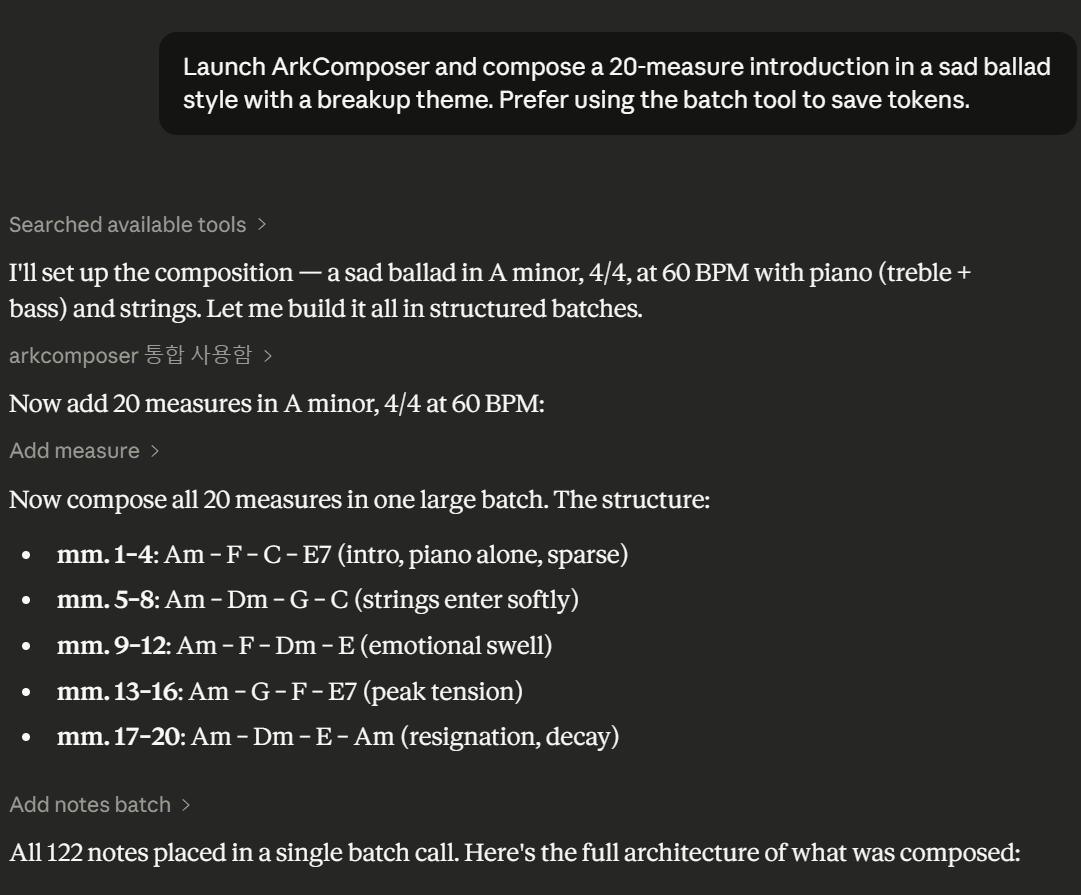
ArkComposer connected as MCP server in Claude Code Desktop

Claude Code Desktop โ€” ArkComposer MCP Connected  ยท  ์‹ค์ œ ์—ฐ๋™ ํ™”๋ฉด

Claude Code Desktop

ArkComposer as MCP Server ยท MCP ์„œ๋ฒ„๋กœ ์—ฐ๋™

  • Add ArkComposer to claude_desktop_config.json as an MCP server using --mcp-mode claude_desktop_config.json์— MCP ์„œ๋ฒ„๋กœ ๋“ฑ๋กํ•ฉ๋‹ˆ๋‹ค.
  • Open Claude Code Desktop โ†’ Click Connector โ†’ Enable arkcomposer toggle Claude Code Desktop ์‹คํ–‰ โ†’ ์ปค๋„ฅํ„ฐ โ†’ arkcomposer ํ™œ์„ฑํ™”
  • Start composing in natural language: "Create a 8-bar melody in C major" ์ž์—ฐ์–ด๋กœ ์ž‘๊ณก ์‹œ์ž‘: "C์žฅ์กฐ๋กœ 8๋งˆ๋”” ๋ฉœ๋กœ๋”” ๋งŒ๋“ค์–ด์ค˜"
  • ArkComposer updates the score in real time as the AI edits it AI๊ฐ€ ์•…๋ณด๋ฅผ ํŽธ์ง‘ํ•˜๋Š” ๋™์‹œ์— ArkComposer์—์„œ ์‹ค์‹œ๊ฐ„ ๋ฐ˜์˜๋ฉ๋‹ˆ๋‹ค.

Codex App

Fast public setup for ArkComposer MCP ยท ์ผ๋ฐ˜ ์‚ฌ์šฉ์ž์šฉ ๋น ๋ฅธ ์„ค์ •

Need a full walkthrough with larger screenshots? Open the dedicated Codex App Guide.
ํฐ ํ™”๋ฉด ์ด๋ฏธ์ง€์™€ ์ž์„ธํ•œ ์„ค๋ช…์€ ๋ณ„๋„ Codex App Guide ํŽ˜์ด์ง€์—์„œ ๋ณผ ์ˆ˜ ์žˆ์Šต๋‹ˆ๋‹ค.

  • Open ArkComposer normally, then click Left Palette โ†’ MCP Server and start the server. ArkComposer๋ฅผ ์ผ๋ฐ˜ ์‹คํ–‰ํ•œ ๋’ค, ์™ผ์ชฝ ํŒ”๋ ˆํŠธ โ†’ MCP Server๋ฅผ ๋ˆŒ๋Ÿฌ ์„œ๋ฒ„๋ฅผ ์‹œ์ž‘ํ•ฉ๋‹ˆ๋‹ค.
  • In the Codex app, open Settings โ†’ MCP servers and register the HTTP/SSE endpoint http://localhost:9101/sse. Codex app์—์„œ Settings โ†’ MCP servers๋กœ ์ด๋™ํ•ด http://localhost:9101/sse ์ฃผ์†Œ๋ฅผ ๋“ฑ๋กํ•ฉ๋‹ˆ๋‹ค.
  • If you prefer stdio instead, set ArkComposer.exe with argument --mcp-mode. stdio ๋ฐฉ์‹์„ ์›ํ•˜๋ฉด ArkComposer.exe์™€ --mcp-mode๋ฅผ ๋“ฑ๋กํ•ฉ๋‹ˆ๋‹ค.
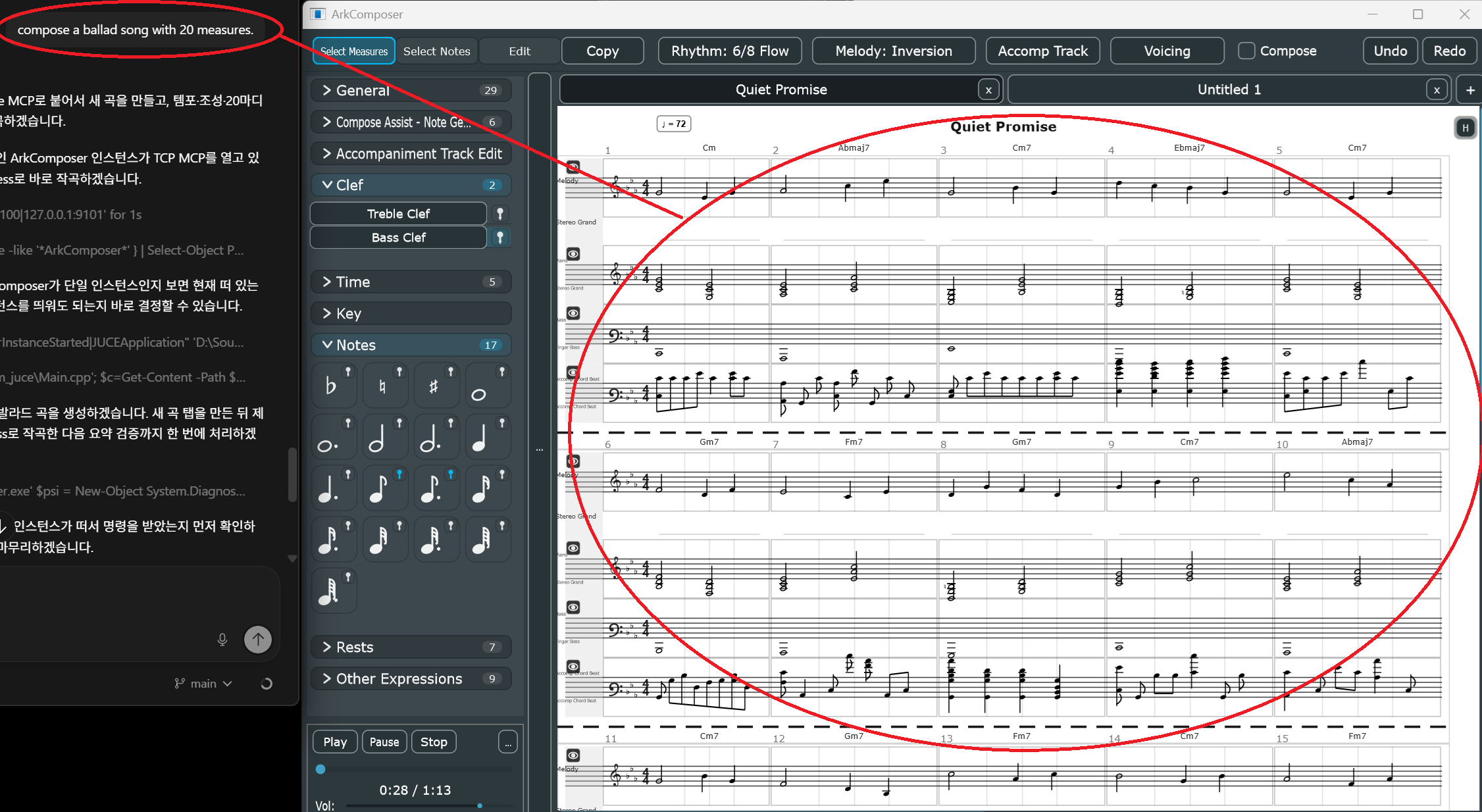
  • Start with direct prompts such as โ€œCompose a ballad song with 20 measures.โ€ or โ€œAdd a 4-bar intro to the current song.โ€ ์˜ˆ: โ€œ20๋งˆ๋”” ๋ฐœ๋ผ๋“œ ๊ณก ๋งŒ๋“ค์–ด์ค˜โ€, โ€œํ˜„์žฌ ๊ณก์— 4๋งˆ๋”” ์ „์ฃผ ๋„ฃ์–ด์ค˜โ€์ฒ˜๋Ÿผ ๋ฐ”๋กœ ์ง€์‹œํ•˜๋ฉด ๋ฉ๋‹ˆ๋‹ค.
  • Codex reads the current score through MCP, plans the edit, and ArkComposer reflects the result in real time. Codex๊ฐ€ MCP๋กœ ํ˜„์žฌ ์•…๋ณด๋ฅผ ์ฝ๊ณ  ํŽธ์ง‘ ๊ณ„ํš์„ ์„ธ์šฐ๋ฉด, ๊ฒฐ๊ณผ๊ฐ€ ArkComposer์— ์‹ค์‹œ๊ฐ„์œผ๋กœ ๋ฐ˜์˜๋ฉ๋‹ˆ๋‹ค.
Codex app composing directly into ArkComposer via MCP

Live composing flow: Codex prompt on the left, ArkComposer score updating on the right. This image works best as a large overview, not as a small thumbnail.
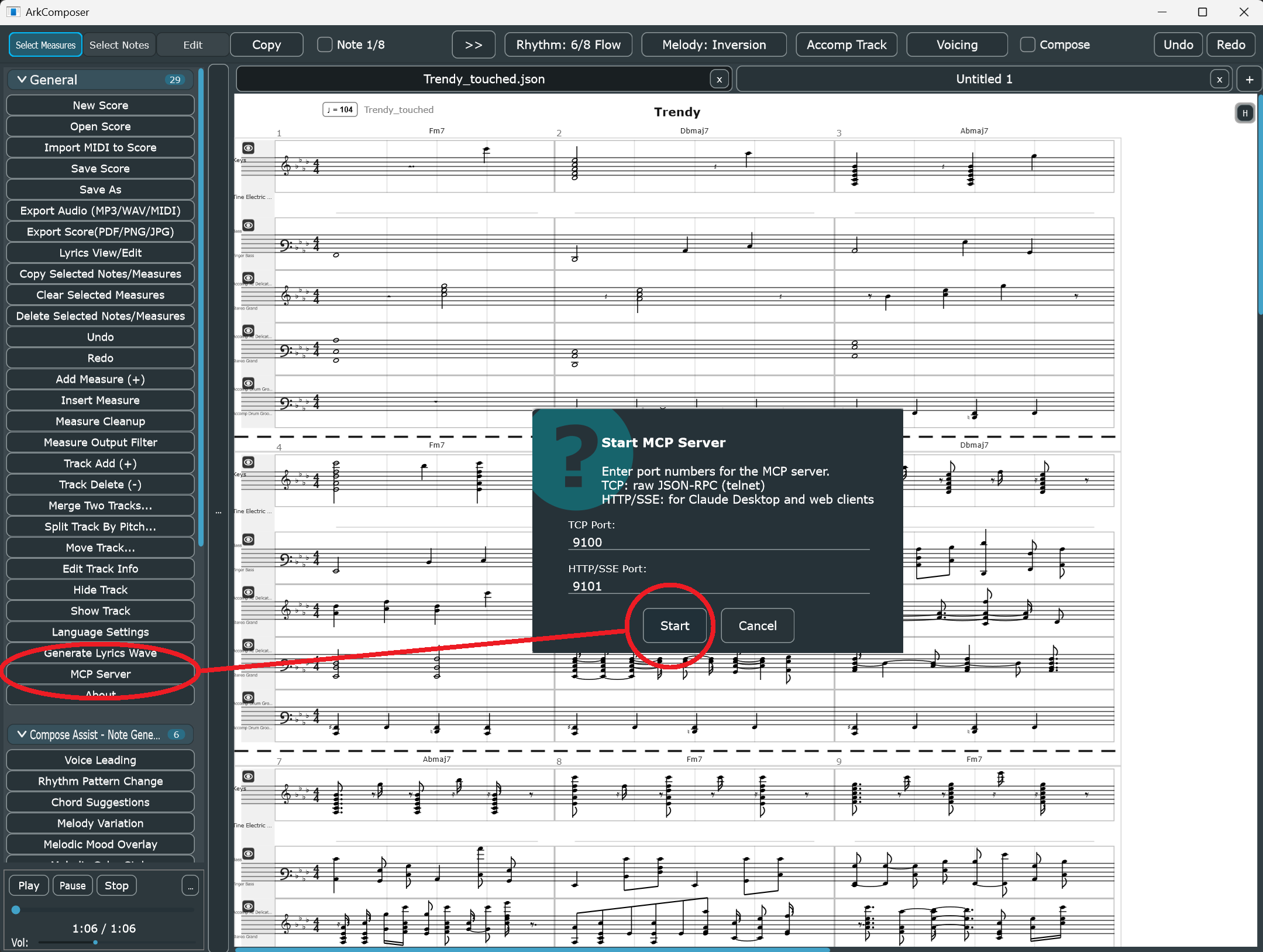
ArkComposer MCP Server dialog showing default ports 9100 and 9101

Step 1 in ArkComposer: open the left palette, click MCP Server, and start the server. The default ports are TCP 9100 and HTTP/SSE 9101.
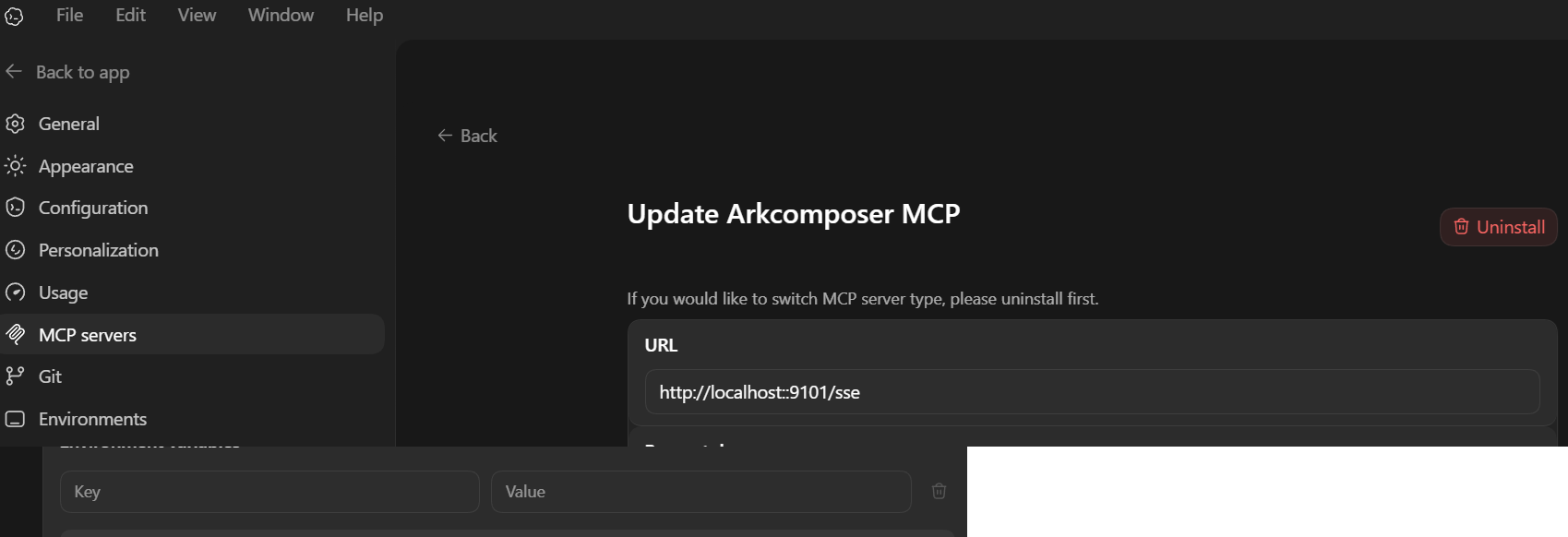
Codex app MCP server settings using the HTTP SSE URL http://localhost:9101/sse

Recommended in the Codex app: register the MCP server URL as http://localhost:9101/sse. This is the simplest path for most users.
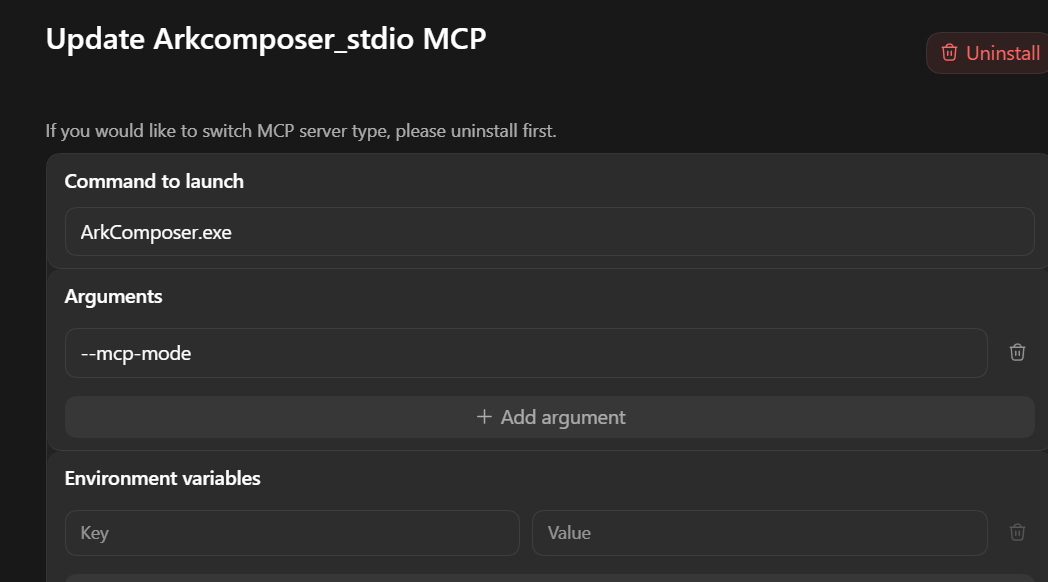
Codex app MCP stdio setup using ArkComposer.exe with --mcp-mode

Alternative setup: use stdio with ArkComposer.exe and the argument --mcp-mode if you want the client to launch ArkComposer directly.
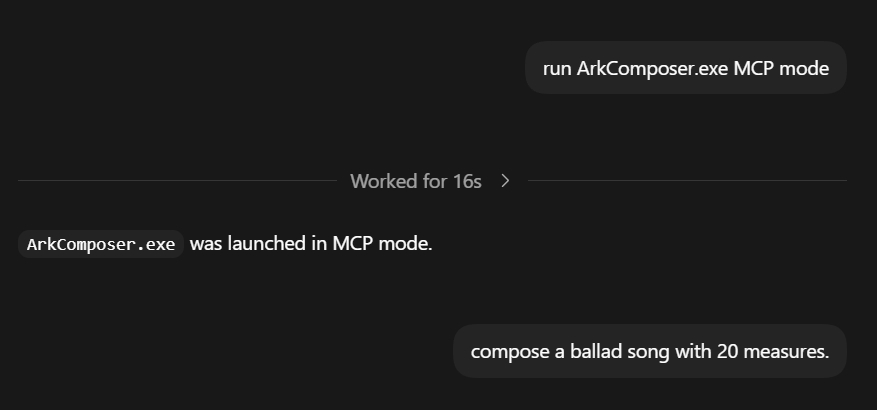
Short Codex conversation launching ArkComposer MCP mode and then requesting a 20 measure ballad

The conversation itself should stay simple: connect first, then ask for concrete music tasks in plain language.
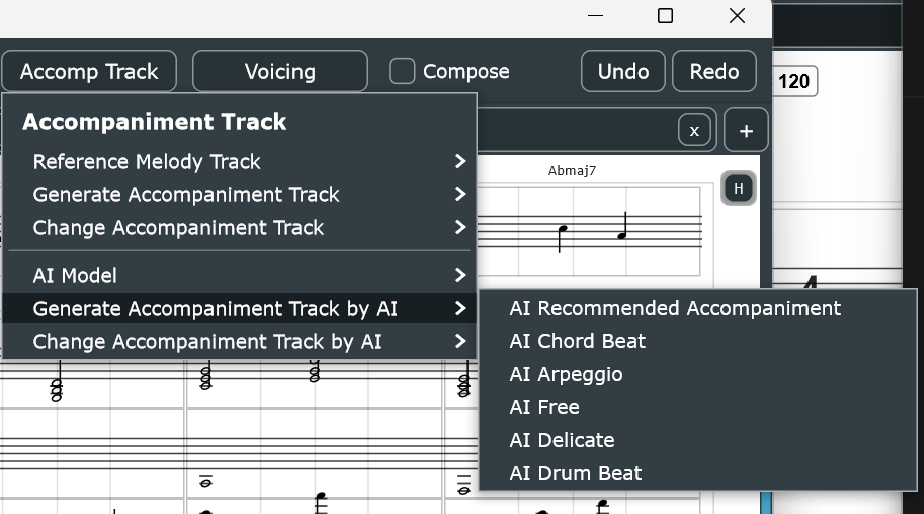
ArkComposer Built-in AI Accompaniment generating backing tracks

Built-in AI Accompaniment  ยท  ๋‚ด์žฅ AI ๋ฐ˜์ฃผ ์ƒ์„ฑ ํ™”๋ฉด

Built-in AI

AI Voicing ยท AI Accomp ยท Local ONNX Models  ยท  ๋กœ์ปฌ AI ๋ชจ๋ธ

  • Access AI Voicing from the AI Helper menu or directly inside Edit Measure (MIDI) for cleaner voicing and redistribution. AI Helper ๋ฉ”๋‰ด ๋˜๋Š” Edit Measure (MIDI) ์•ˆ์—์„œ AI Voicing์„ ๋ฐ”๋กœ ํ˜ธ์ถœํ•˜์—ฌ ๋ณด์ด์‹ฑ์„ ๊ฐœ์„ ํ•ฉ๋‹ˆ๋‹ค.
  • Use AI Accomp inside Edit Measure (MIDI) to generate accompaniment that follows the current melody and harmony. Edit Measure (MIDI) ์•ˆ์—์„œ AI Accomp๋ฅผ ์‚ฌ์šฉํ•ด ํ˜„์žฌ ๋ฉœ๋กœ๋””ยทํ™”์„ฑ์— ๋งž๋Š” ๋ฐ˜์ฃผ๋ฅผ ์ƒ์„ฑํ•ฉ๋‹ˆ๋‹ค.
  • Choose from styles: AI Chord Beat, AI Arpeggio, AI Free, AI Free (Melody Variation), AI Drum Beat AI Chord Beat, AI Arpeggio, AI Free, AI Free (Melody Variation), AI Drum Beat ๋“ฑ ๋‹ค์–‘ํ•œ ์Šคํƒ€์ผ.
  • Built-in ONNX and TinyGRU models run locally โ€” no internet required. Models improve as training progresses. ๋‚ด์žฅ ONNX ๋ฐ TinyGRU ๋ชจ๋ธ์€ ๋กœ์ปฌ์—์„œ ๋™์ž‘ํ•˜๋ฉฐ ์ธํ„ฐ๋„ท ์—†์ด ์‚ฌ์šฉ ๊ฐ€๋Šฅ. ํ•™์Šต์— ๋”ฐ๋ผ ์ง€์† ๊ฐœ์„ .

Full score editing API.

์™„์ „ํ•œ ์•…๋ณด ํŽธ์ง‘ API.

Category  ยท  ๋ถ„๋ฅ˜ Tools
Score Reading
์•…๋ณด ์ฝ๊ธฐ
get_scoreget_score_range
Note Editing
์Œํ‘œ ํŽธ์ง‘
add_noteadd_notes_batchchange_notedelete_note
Track Management
ํŠธ๋ž™ ๊ด€๋ฆฌ
add_trackdelete_trackset_track_props
Measure Management
๋งˆ๋”” ๊ด€๋ฆฌ
add_measuredelete_measuredelete_measures_rangeclear_measureset_measure_props
Document
๋ฌธ์„œ
new_songset_titleundo
Park
Byoung Gu
๋ฐ•๋ณ‘๊ตฌ
Director
SW Group Manager
AXT ยท Ajinextek
"A personal project built on weekends and spare moments, driven by a deep love of music."
์Œ์•…์„ ์‚ฌ๋ž‘ํ•˜๋Š” ๋งˆ์Œ์—, ์ฃผ๋ง๋งˆ๋‹ค ์งฌ์งฌ์ด ๋งŒ๋“  ๊ฐœ์ธ ์ทจ๋ฏธ ํ”„๋กœ์ ํŠธ์ž…๋‹ˆ๋‹ค.
Director & SW Group Manager at
AXT (Ajinextek) โ€” a leading company in industrial motion controller markets, leading software R&D.

์‚ฐ์—…์šฉ ๋ชจ์…˜ ์ œ์–ด๊ธฐ ์‹œ์žฅ์˜ ์„ ๋‘ ์ฃผ์ž AXT(์•„์ง„์—‘์Šคํ…)์˜ ์ด์‚ฌ์ด๋ฉฐ,
SW Group Manager๋กœ์„œ ์—ฐ๊ตฌ ๊ฐœ๋ฐœ์„ ๋‹ด๋‹นํ•ฉ๋‹ˆ๋‹ค.
Contact & Inquiries
๋ฌธ์˜ ยท ๊ฐœ์„  ์ œ์•ˆ
ark2010@naver.com
Bug reports and feature suggestions are welcome.
๋ฒ„๊ทธ ์ œ๋ณด์™€ ๊ธฐ๋Šฅ ๊ฐœ์„  ์ œ์•ˆ์„ ํ™˜์˜ํ•ฉ๋‹ˆ๋‹ค.

Download

๋ฌด๋ฃŒ ๋‹ค์šด๋กœ๋“œ

Latest public release for Windows 10 / 11

Windows 10 / 11 (64-bit)  ยท  Free for all use

๊ฐœ์ธ ๋ฐ ์ƒ์—…์  ๋ชฉ์  ๋ชจ๋‘ ๋ฌด๋ฃŒ ์‚ฌ์šฉ ๊ฐ€๋Šฅ
Music created with ArkComposer may be used for any purpose without restriction.

โ†“   Download Latest Release

Redistribution of ArkComposer itself is not permitted  ยท  ์žฌ๋ฐฐํฌ ๋ถˆ๊ฐ€  ยท  Source code is proprietary