This guide explains the fastest and most reliable way to connect ArkComposer to the Codex app through MCP.
For most users, the recommended path is HTTP/SSE with http://localhost:9101/sse. 이 페이지는 ArkComposer를 Codex app에 MCP로 가장 빠르고 안정적으로 연결하는 방법을 설명합니다. 대부분의 사용자는 HTTP/SSE 방식 http://localhost:9101/sse를 쓰는 것이 가장 쉽습니다.
01
Start MCP In ArkComposer
ArkComposer에서 MCP 서버 시작
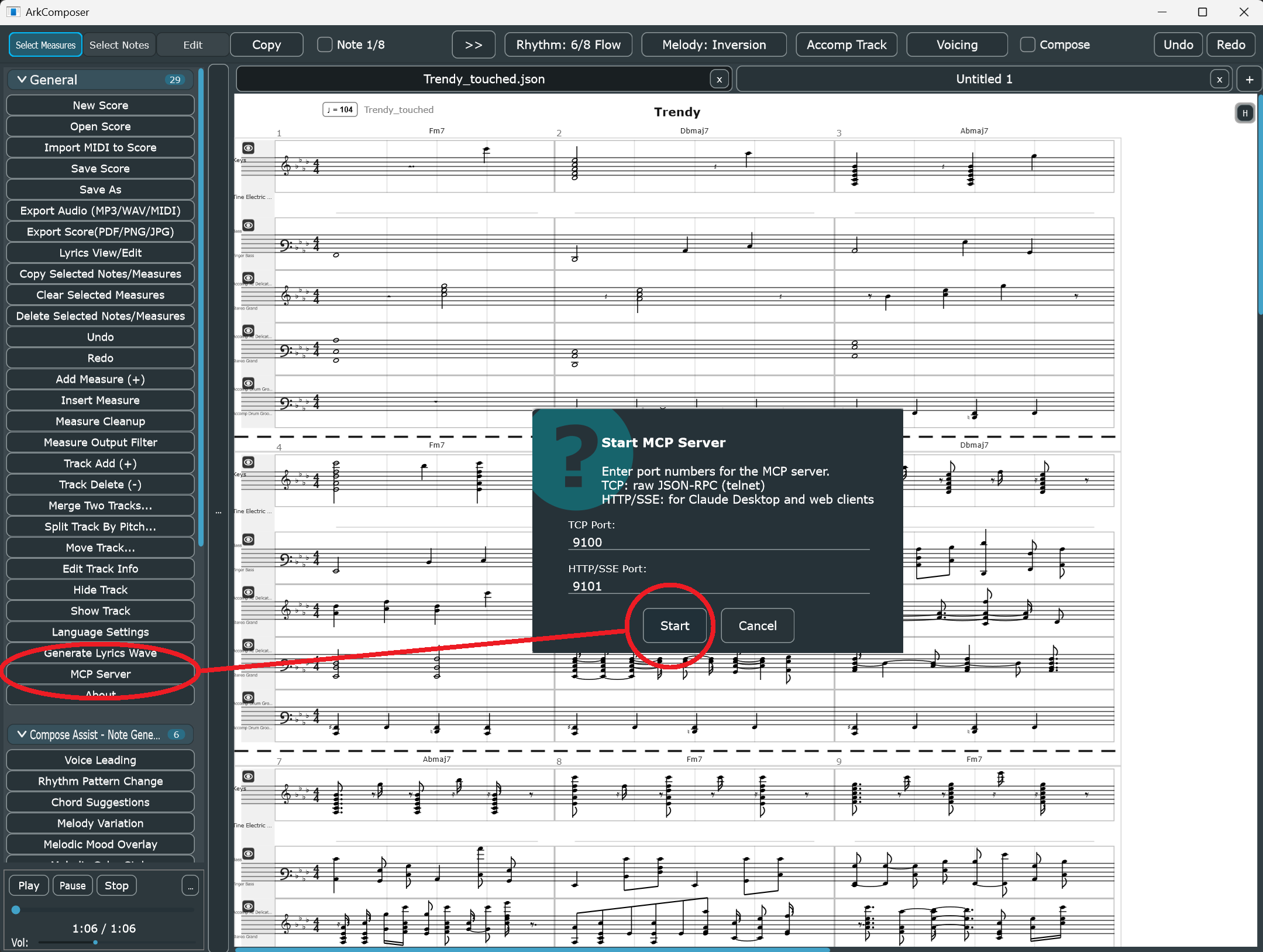
Open ArkComposer normally, then launch the built-in MCP Server from the left palette.
일반 실행 후 왼쪽 팔레트에서 MCP 서버를 시작합니다.
02
Register In Codex App
Codex app에 서버 등록
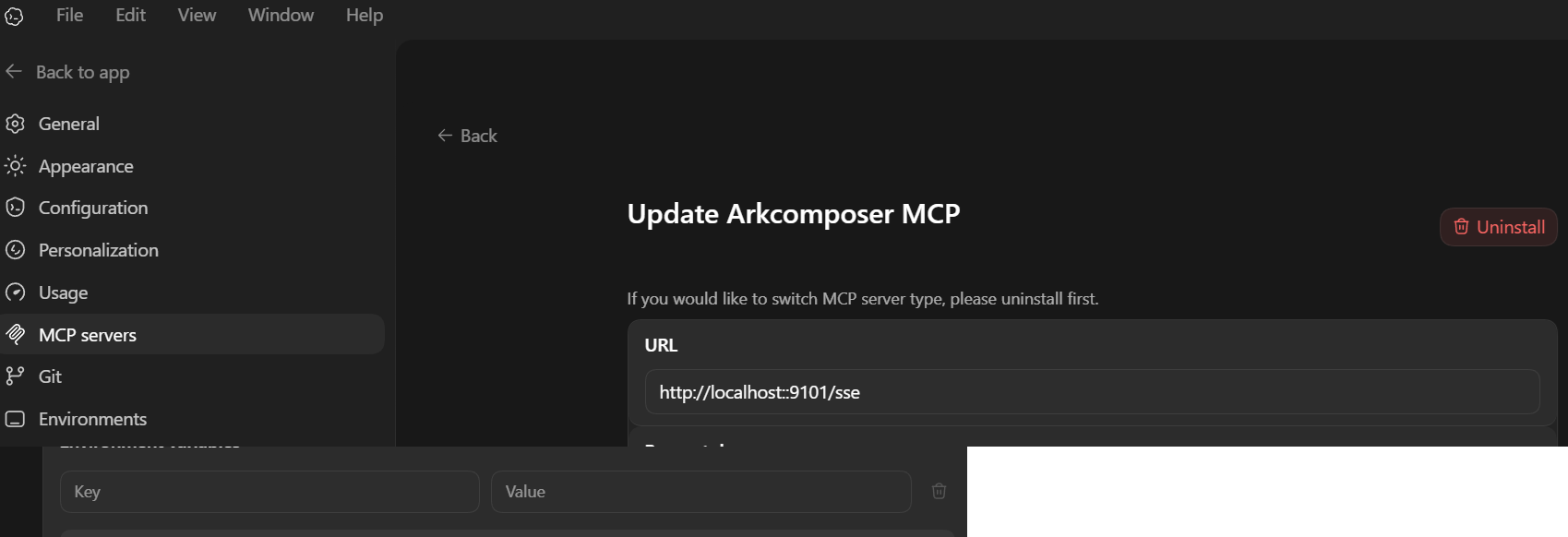
Open Settings → MCP servers and register the HTTP/SSE URL.
Settings → MCP servers에서 HTTP/SSE URL을 등록합니다.
03
Compose By Chat
대화로 작곡 시작
Describe the music you want. Codex reads the score and edits ArkComposer in real time.
원하는 음악을 말하면 Codex가 악보를 읽고 실시간으로 편집합니다.
01
Start the MCP Server in ArkComposer
ArkComposer에서 MCP 서버 시작
Run ArkComposer normally. In the left palette, click MCP Server, confirm the port values, and press Start.
The built-in dialog exposes two ports: raw TCP JSON-RPC and HTTP/SSE. ArkComposer를 일반 실행한 뒤 왼쪽 팔레트의 MCP Server를 눌러 포트를 확인하고 Start를 누릅니다. 이 창에는 TCP와 HTTP/SSE 두 가지 포트가 함께 표시됩니다.
Default values shown in ArkComposer: TCP 9100, HTTP/SSE 9101. These are the values most users should keep.
Recommended
For the Codex app, prefer the HTTP/SSE port.
Default URL: http://localhost:9101/sse Codex app에서는 HTTP/SSE 포트를 권장합니다. 기본 URL은 http://localhost:9101/sse 입니다.
02
Add ArkComposer in Codex App
Codex app에 ArkComposer 등록
Open the Codex app, then go to Settings → MCP servers.
Create or update the ArkComposer MCP entry and point it to the HTTP/SSE endpoint from ArkComposer. Codex app에서 Settings → MCP servers로 이동한 뒤, ArkComposer MCP 항목을 만들고 ArkComposer에서 표시된 HTTP/SSE 주소를 등록합니다.
Recommended Codex app setup: enter http://localhost:9101/sse as the server URL.
①
Open Settings in the Codex app
Codex app에서 Settings를 엽니다
②
Select MCP serversMCP servers 메뉴를 선택합니다
③
Create or update the ArkComposer server entry with http://localhost:9101/ssehttp://localhost:9101/sse 주소로 ArkComposer 서버 항목을 생성 또는 수정합니다
Important
If you want to switch between HTTP/SSE and stdio in the Codex app, uninstall the existing ArkComposer MCP entry first, then create the new one. Codex app에서는 HTTP/SSE와 stdio 타입을 서로 바꾸려면 기존 ArkComposer 항목을 먼저 제거한 뒤 새로 만들어야 합니다.
03
Optional stdio Setup
선택 사항: stdio 방식
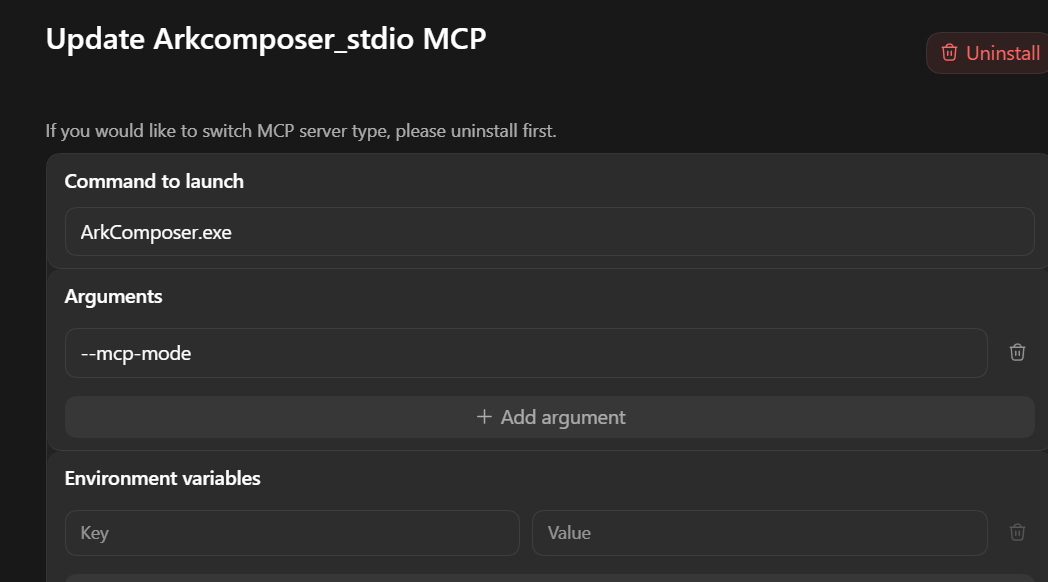
If you want the client to launch ArkComposer directly, use stdio instead of HTTP/SSE.
In that case, set the command to ArkComposer.exe and add the argument --mcp-mode. 클라이언트가 ArkComposer를 직접 실행하도록 하려면 HTTP/SSE 대신 stdio를 사용하세요. 이 경우 명령은 ArkComposer.exe, 인자는 --mcp-mode로 설정합니다.
Stdio alternative: ArkComposer.exe + --mcp-mode
When to use this
Use stdio when you want one-click launch directly from the MCP client.
Use HTTP/SSE when you want the simplest public setup and clear port-based control from ArkComposer itself. 클라이언트에서 ArkComposer를 직접 실행하고 싶다면 stdio, 일반 사용자에게 가장 쉬운 공개 설정은 HTTP/SSE를 권장합니다.
04
Compose by Conversation
대화로 작곡 시작
Once connected, keep the prompt simple and concrete. Ask for song length, mood, style, and the kind of edit you want.
Good prompts are short, direct, and musical. 연결 후에는 프롬프트를 짧고 구체적으로 유지하세요. 길이, 분위기, 스타일, 원하는 편집 내용을 직접 말하면 됩니다.
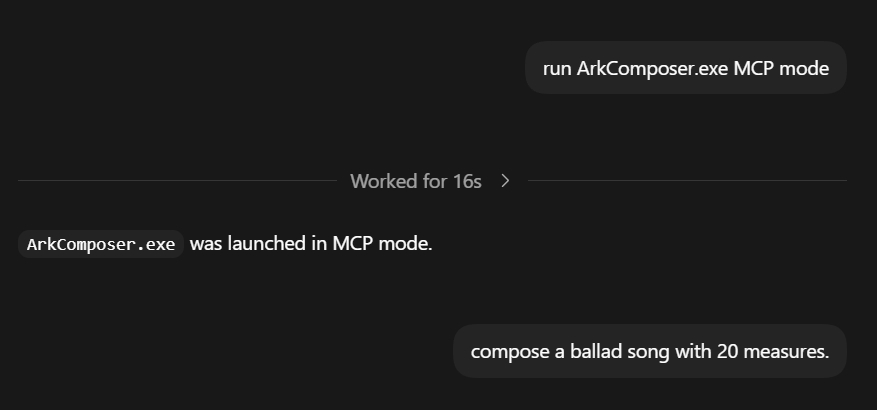
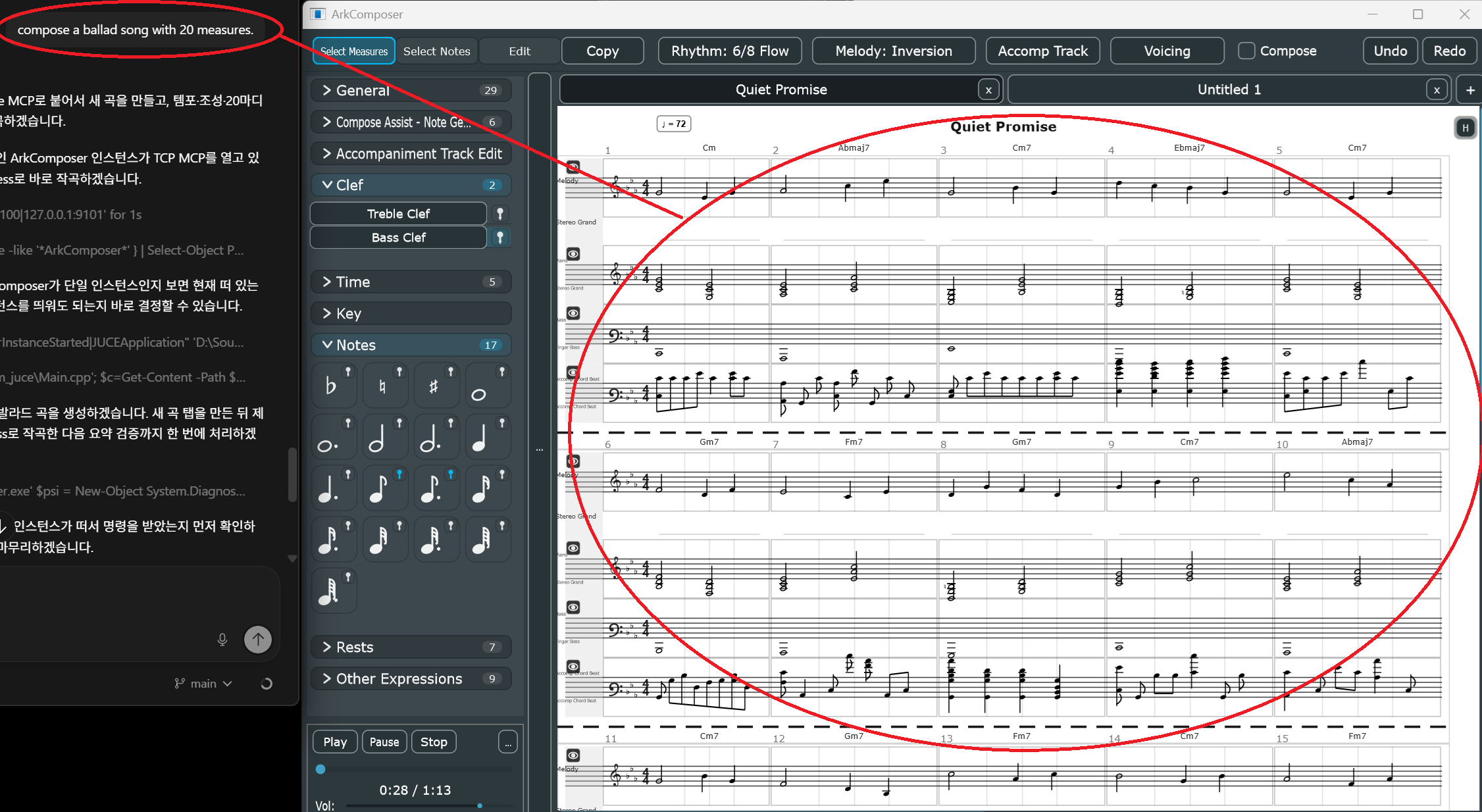
compose a ballad song with 20 measures.
Connect first, then request the music in plain language.
Codex prompt on the left, ArkComposer score updating on the right.
♩
Ask for new composition: “Compose a ballad song with 20 measures.”새 곡 작곡 예: “20마디 발라드 곡 만들어줘”
♩
Ask for editing: “Add a 4-bar intro to the current song.”편집 예: “현재 곡에 4마디 전주 넣어줘”
♩
Ask for clear constraints: key, tempo, meter, mood, instrumentation
조성, 템포, 박자, 분위기, 악기 구성을 구체적으로 말하면 결과가 더 좋아집니다
Operational Rule
Codex should inspect the current score before editing it. In practice, that means MCP clients should read the score first and only then compose or modify a target passage. Codex는 편집 전에 현재 악보를 먼저 읽는 것이 원칙입니다. 실제로는 target passage를 수정하기 전에 score를 먼저 읽어야 합니다.
05
Troubleshooting
문제 해결
①
If the Codex app cannot connect, confirm that ArkComposer is still running and the MCP Server dialog was actually started.
연결이 안 되면 ArkComposer가 실행 중인지, MCP Server를 실제로 시작했는지 먼저 확인합니다.
②
If the URL entry seems correct but the connection still fails, remove the existing ArkComposer MCP entry in the Codex app and create it again.
URL이 맞는데도 실패하면 Codex app의 ArkComposer MCP 항목을 삭제 후 다시 만듭니다.
③
If you changed transport type, uninstall first. Do not try to convert one saved MCP entry from HTTP/SSE to stdio in place.
전송 타입을 바꿨다면 먼저 제거하세요. 저장된 항목을 HTTP/SSE에서 stdio로 바로 덮어 바꾸려 하지 마세요.
④
If things feel stuck, fully close both Codex app and ArkComposer, then start again from a clean state.
문제가 꼬이면 Codex app과 ArkComposer를 모두 완전히 종료한 뒤 다시 시작합니다.
Common Cause
The most common cause of MCP problems is a stale client or app process still running in memory.
A full restart is often faster than trying partial recovery steps repeatedly. 가장 흔한 원인은 메모리에 남아 있는 이전 프로세스입니다. 부분 복구를 반복하기보다 완전 재시작이 더 빠른 경우가 많습니다.
—
Reference Notes
참고 메모
Recommended endpoint for Codex app:
http://localhost:9101/sse
Alternative stdio launch:
ArkComposer.exe --mcp-mode
Advanced raw TCP endpoint:
localhost:9100
Built-in docs
ArkComposer also exposes its own AI usage docs through MCP resources, including: arkcomposer://docs/how-to-use-llm ArkComposer는 MCP 리소스로 AI 사용 가이드를 직접 제공합니다. 예: arkcomposer://docs/how-to-use-llm